
Know the moment something needs you, across every part of ISO Mate, without drowning in noise you do not care about.
The challenge it solves
Important updates get buried in email or scattered across tools, so you either miss what matters or get interrupted all day. Notifications gives you one real-time stream you can tune to your role, so the right things reach you at the right time.
What you can do
- Get told the moment it matters: real-time alerts when you are assigned to tasks, issues, or incidents, when statuses change, when due dates approach, and when someone mentions you in chat.
- See activity from every module: one stream covering Tasks, Issues, Calendar, QA, Incidents, Compliance, Email, Account, Workflows, Custom Objects, Notes, and Chat.
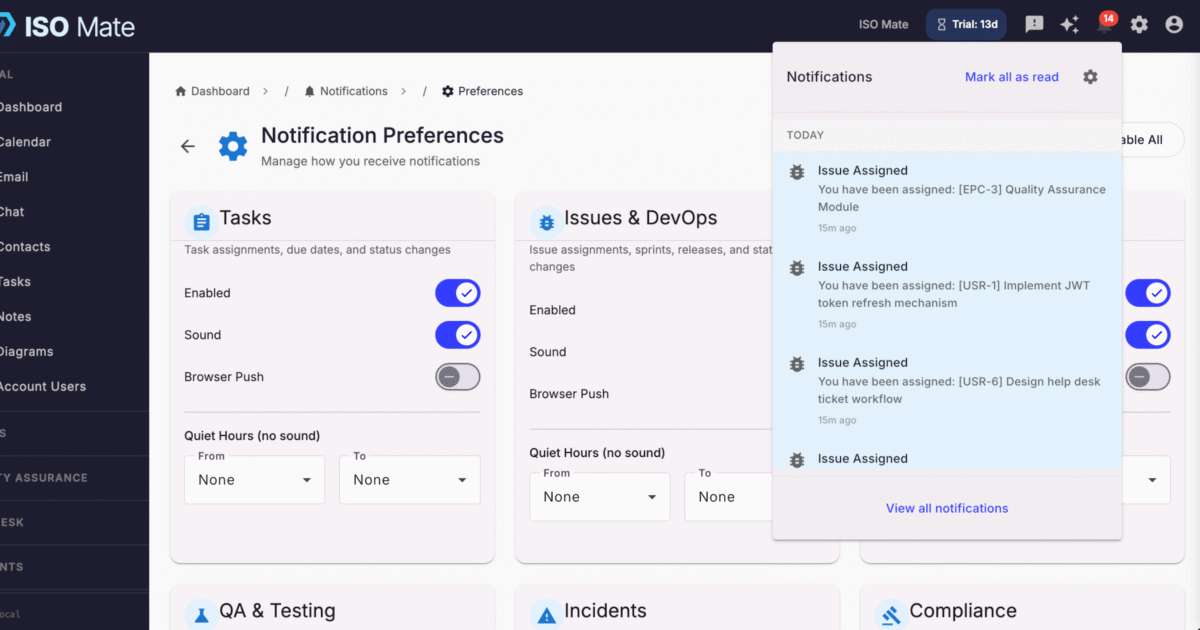
- Tune it to your role: enable or disable each category independently so you only see what is relevant to you.
- Protect your focus: set quiet hours to pause notifications during evenings, weekends, and off-hours.
- Make it personal: preferences are per-user, so every team member controls their own experience.
- Clear the queue fast: open the notification tray in the header to mark as read, delete, or act in bulk.
Popular use cases
- Assignment awareness: know the instant a task, issue, or incident lands on your plate.
- Deadline management: catch approaching due dates before they slip.
- Team collaboration: get a ping when a teammate mentions you in chat.
- Workflow visibility: see when an automation runs or needs your input.
- Compliance deadlines: stay ahead of attestations, policy reviews, and control checks.
- Incident response: get alerted the moment an incident is raised or its status changes.
Works with the rest of ISO Mate
Notifications is the connective tissue across ISO Mate. It surfaces activity from Tasks, Issues, Calendar, QA, Incidents, Compliance, Email, Account, Workflows, Custom Objects, Notes, and Chat in one place. Workflow Automation can send its own notifications as an action, and every alert respects your per-category preferences and quiet hours, so you stay informed within your account’s role-based permissions and without the noise.
Key benefits at a glance
- One stream for everything: activity from twelve modules in a single tray.
- Never miss what matters: real-time alerts for assignments, changes, and deadlines.
- No unnecessary noise: per-category control and quiet hours keep it focused.
- Yours to control: per-user preferences for every team member.