
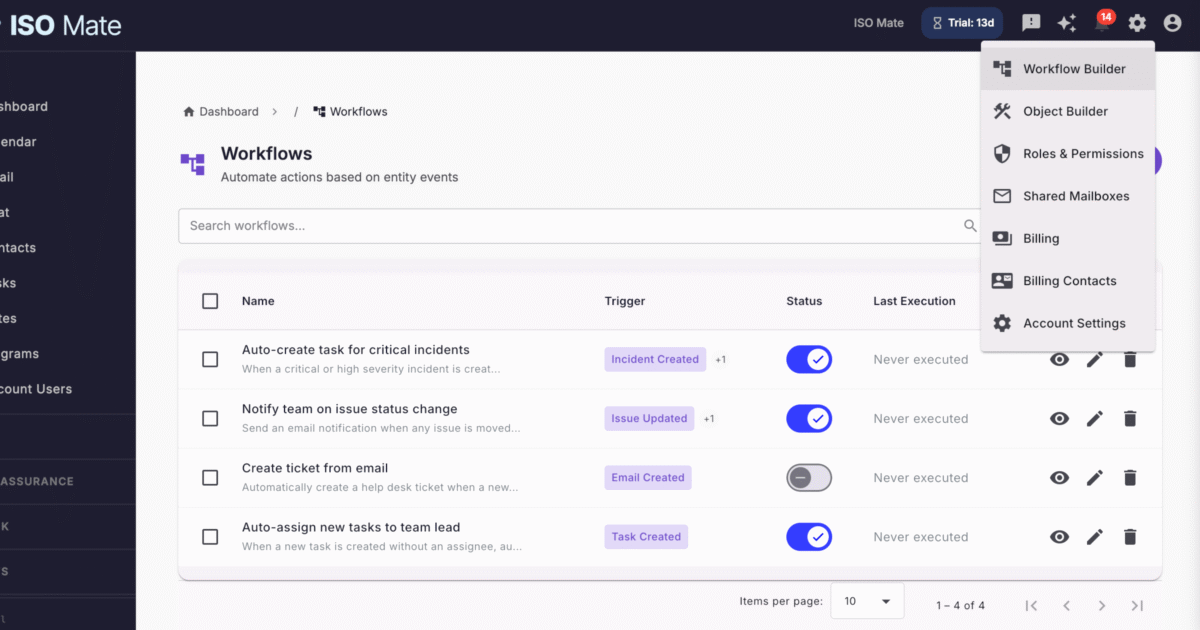
Stop doing repetitive work by hand. Workflow Automation lets any team turn manual, error-prone processes into reliable automations that run the moment something happens, all from a visual editor.
The challenge it solves
Routine work quietly drains your team: chasing approvals, copying data between records, sending the same reminders, and reacting to events long after they happen. Manual steps get forgotten, follow-ups slip, and nothing scales with the business. Workflow Automation runs these processes for you, triggered automatically and executed the same way every time.
What you can do
- Trigger work automatically: start workflows from record events and field changes, schedules, date offsets, inactivity, manual runs, inbound webhooks, or public form submissions.
- Automate across the whole platform: act on 30+ entity types, from Tasks, Issues, and Test Executions to Tickets, Emails, Sales records, and Custom Object Entries.
- Compose rich actions: choose from 30 action types to update records, send emails and notifications, manage tickets, create calendar events, call external APIs, and generate PDFs.
- Keep email conversations in one place: extract ticket references from inbound mail, link the email to the right ticket, and append the reply straight into the ticket conversation.
- Add logic and scale: branch with if/else conditions, loop over collections with for-each, pause with wait steps, and reuse logic by calling sub-workflows.
- Build visually with guided placeholders: compose dynamic values from trigger fields, related records, previous step outputs, and loop items, then shape them with filters like upper, date, truncate, and join.
- Let AI do the heavy lifting: summarize, classify, and draft responses inside a workflow, or describe what you want and have the assistant build the whole workflow for you.
- Launch fast and stay in control: start from pre-built templates, then govern everything with versioning, audit logs, dry runs, metrics, and per-workflow rate limits.
Popular use cases
- Overdue task reminders: notify owners automatically before or after a due date so nothing slips.
- Sales follow-ups: when a deal is won or a lead changes stage, log activity, create tasks, and send the right email.
- Support ticket routing: classify inbound emails, create tickets, assign SLAs, and escalate the urgent ones.
- Email replies in the right thread: match a customer reply to its existing ticket and add it to that ticket’s conversation, so agents never hunt through a mailbox.
- Incident response: escalate critical incidents, notify responders, and open follow-up tasks the moment severity rises.
- Compliance reminders: send a data breach 72-hour reminder or a policy acknowledgement request on schedule.
- Scheduled digests: pull recent records, summarize them with AI, generate a PDF, and email the digest every week.
Works with the rest of ISO Mate
Workflow Automation reaches almost every corner of ISO Mate. Trigger on and act across Tasks, DevOps issues, sprints, and releases, QA test cases, cycles, and executions, Incidents, Compliance records, Sales leads, opportunities, and deals, Help Desk tickets, Emails, Calendar events, Notes, Feedback, and Custom Object Entries. Send email through your shared mailboxes, raise in-app notifications, and let the AI Assistant build new workflows from a plain description. Role-based permissions and feature flags keep every capability under your control.
Key benefits at a glance
- Save hours every week: repetitive, multi-step processes run on their own.
- Fewer mistakes: consistent execution removes forgotten steps and manual errors.
- Start fast: a gallery of pre-built templates gets you live in minutes.
- Built-in governance: versioning, audit logs, dry runs, and metrics keep automations safe.
- Reliable by design: rate limits, failure alerts, and cadence guardrails protect shared performance.