
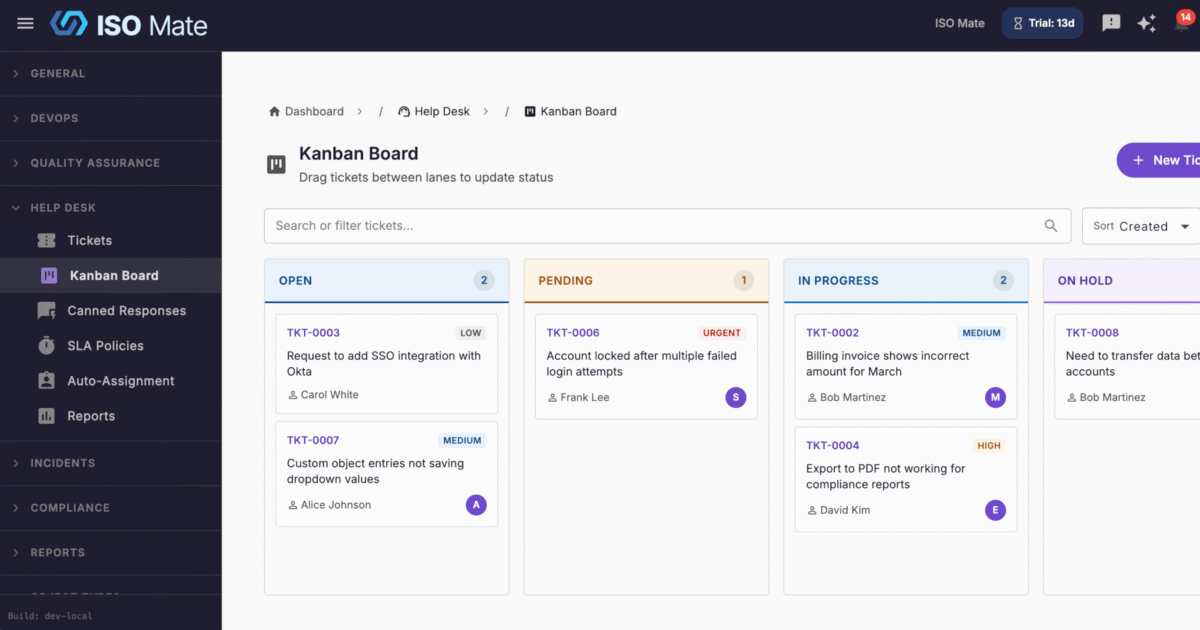
Run customer support without leaving your workspace. Help Desk gives support teams a complete ticket system with SLAs, smart routing, and satisfaction surveys, so requests get answered on time and nothing slips.
The challenge it solves
Support that runs on a shared inbox quickly falls apart. Requests get missed or answered twice, no one owns the conversation, and there is no way to prove you hit your response targets. Help Desk turns incoming requests into tracked tickets with clear status, ownership, and deadlines so your team stays on top of every conversation.
What you can do
- Track every request end to end: manage tickets through Open, Pending, In Progress, On Hold, Resolved, and Closed with priority, category, and channel on each one.
- Hit your response targets: define SLA policies with first response and resolution goals per priority, and the clock pauses while a ticket is Pending or On Hold.
- Route work automatically: assign tickets by hand, or use round robin and category-based auto-assignment rules to reach the right agent.
- Reply faster and stay consistent: insert shared canned responses and send from the correct shared mailbox so email arrives from the right address.
- Keep the whole conversation in one thread: customer replies that arrive by email are appended to the ticket they belong to, attributed to the sender, so agents read the exchange in order instead of hunting through a mailbox.
- See instantly who owes the next message: tickets whose most recent reply came from the requester are flagged on the board with how long they have been waiting, and float to the top of their column.
- Work as a team on every ticket: use public replies, private internal notes, presence and typing indicators, watchers, and ticket merging to avoid duplicate effort.
- Connect tickets to emails and issues: link a ticket to email conversations and to DevOps issues, create a new issue straight from a ticket, and open the linked record from either side.
- Manage the queue your way: use a drag-and-drop Kanban board, filters for SLA status and who a ticket is waiting on, presets like My Open Tickets and SLA Breaching, bulk updates, and CSV or PDF export.
Popular use cases
- Customer support: manage inbound questions and issues from first contact to resolution, with every email reply threaded onto the right ticket.
- IT service desk: field internal requests for access, hardware, and troubleshooting.
- Billing and account queries: route finance questions to the right team with category rules.
- Bug intake: capture Bug Report tickets and link them to Issues for the development team.
- Incident coordination: link tickets to Incidents so support and response teams stay aligned.
- Facilities and HR requests: give staff one place to raise internal service requests.
Works with the rest of ISO Mate
Help Desk is deeply connected across the platform. Workflow Automation can convert incoming emails into tickets, recognize a reply to an existing ticket and add it to that ticket’s conversation, send auto-responders, auto-assign, escalate, apply SLA policies, and send canned responses. Shared mailboxes from Email Integration deliver branded replies, and you can link an email conversation to a ticket or open a related activity panel to create one from a message. Tickets link to Issues, Tasks, and Incidents for traceability, and you can create a new issue straight from a ticket, with the connection visible from both sides. Requesters are matched to your Contacts directory, Reporting and Analytics adds dedicated Help Desk dashboards, the AI Assistant can create and look up tickets, and notifications keep agents on top of assignments and SLA breaches.
Key benefits at a glance
- On-time support: SLA targets and breach indicators keep responses accountable.
- No reply goes unnoticed: waiting tickets are flagged and float to the top of the board.
- Less manual routing: auto-assignment sends every ticket to the right agent.
- Faster, consistent replies: canned responses and shared mailboxes standardize your voice.
- Happier customers: a branded requester portal and CSAT surveys close the loop.
- Full visibility: a Kanban board, reports, and audit logs show the whole operation.