
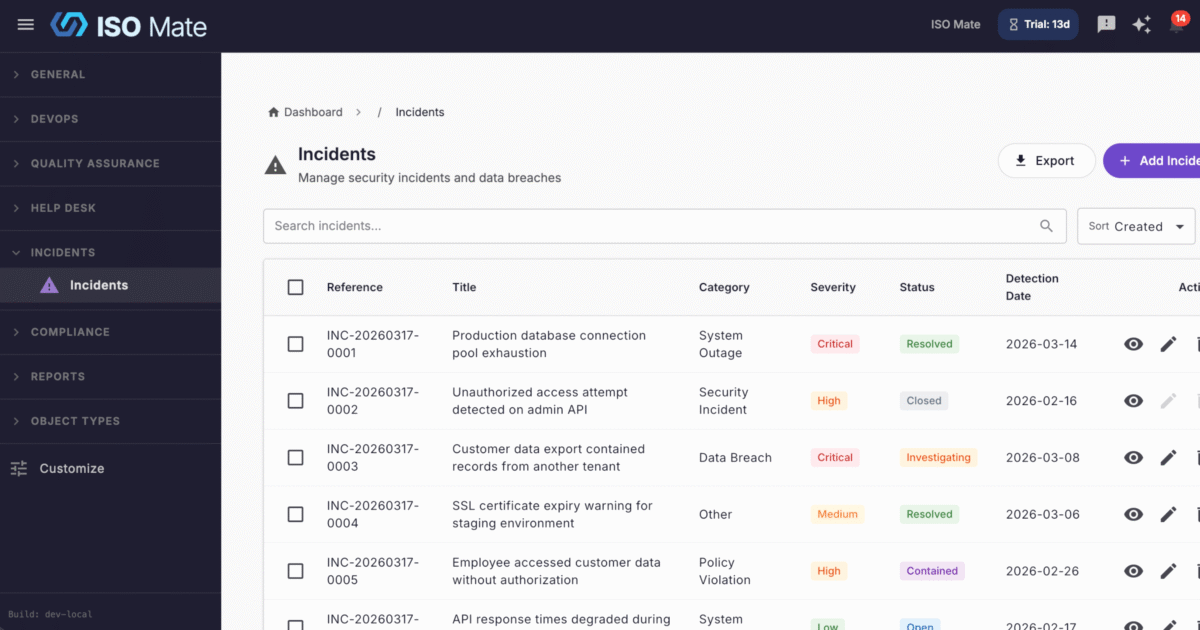
Respond to incidents with a clear process and a defensible record. Incident Management gives security, IT, and compliance teams a structured way to log, investigate, contain, and close incidents from first report to final resolution.
The challenge it solves
When something goes wrong, the last thing you need is a scramble across chat threads and email to work out what happened and who is doing what. Ad hoc incident handling leaves gaps in the timeline, risks missed regulatory deadlines, and gives auditors little solid to review.
What you can do
- Classify every incident consistently: sort by category across data_breach, security_incident, system_outage, policy_violation, and other, with GDPR-specific fields on data breaches.
- Prioritize by impact: set severity to critical, high, medium, or low so the most serious incidents get attention first.
- Follow a controlled workflow: move incidents through open, investigating, contained, resolved, and closed with validated transitions.
- Assign clear ownership: give people reporter, assignee, or stakeholder roles for the right level of visibility and responsibility.
- Document as you investigate: capture timestamped investigation notes and attach evidence files to support your findings.
- Prove what happened: rely on an audit log of every status change, assignment, and update, and export incident lists to CSV or PDF.
Popular use cases
- Data breach response: log a data breach with GDPR fields, track containment, and keep a defensible timeline.
- Security incident triage: capture security events, assign an owner, and drive them to resolution.
- System outage tracking: record the disruption, coordinate the fix, and keep stakeholders informed.
- Policy violation handling: document the breach, investigate, and record the outcome.
- Post-incident review: use timestamped notes and the audit log to run a clean retrospective.
- Regulator and audit reporting: export incident records to show a complete, timestamped history.
Works with the rest of ISO Mate
Incident Management is wired into the rest of the platform. Link incidents to Tasks to track remediation work and to Notes for supporting detail, and raise an incident straight from a Help Desk ticket when a support case turns serious. Workflow Automation can trigger on incidents to notify responders and open follow-up work, Reporting and Analytics includes dedicated incident reports, and notifications keep owners and stakeholders informed. The AI Assistant can query your incidents and even create one from a plain-language description.
Key benefits at a glance
- Faster, calmer response: a clear path from open to closed keeps everyone aligned.
- Regulator-ready records: GDPR fields on breaches and a complete audit log.
- Clear ownership: reporter, assignee, and stakeholder roles on every incident.
- Fully connected: works with tasks, notes, help desk, workflows, reporting, and AI.