
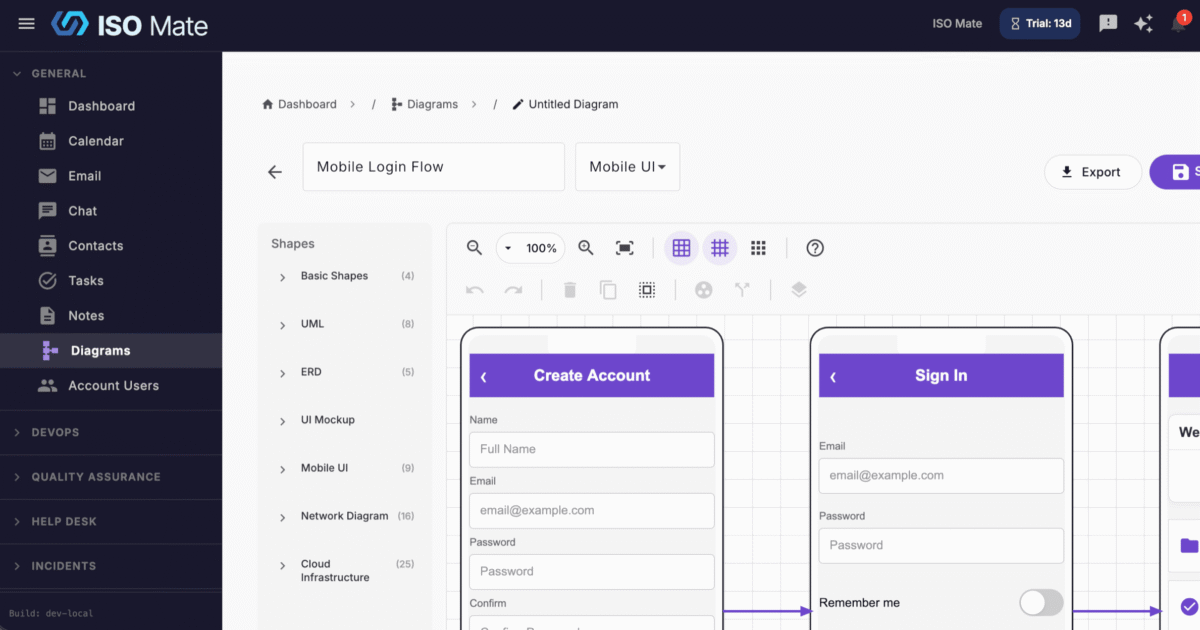
Turn ideas into clear visuals without leaving ISO Mate, from system architecture to process flows, and generate a first draft with AI in seconds.
The challenge it solves
Diagrams usually live in a separate tool, drift out of date, and are a chore to share with the team. Starting from a blank canvas is slow, so they often never get made. Diagram Builder puts visual documentation right beside your work and gives you an AI head start.
What you can do
- Draw on an interactive canvas: place shapes, connectors, and text labels, then drag them into position.
- Diagram almost anything: a shape library for UML diagrams, entity-relationship diagrams, flowcharts, and general-purpose diagrams.
- Route connections precisely: straight or orthogonal (right-angle) connectors that snap to connection points, with custom waypoints.
- Start from a description, not a blank canvas: Create with AI generates a full layout of shapes and connectors, picks a diagram type, and lets you refine it with follow-up requests before anything is saved.
- Share in any format: export to PNG for slides and documents, or PDF for printing and sharing.
- Keep your library tidy: search by name, filter by type, review creation and update history, and bulk delete what you no longer need.
Popular use cases
- System architecture: document how applications and services fit together.
- Business process maps: chart operations and approval flows so everyone follows the same steps.
- Database design: model your data with entity-relationship diagrams.
- Org charts: visualize team structure and reporting lines for HR and planning.
- ISO 27001 data flows: map how information moves through your systems for compliance.
- Incident timelines: lay out the sequence of an incident for a clear post-incident review.
Works with the rest of ISO Mate
Diagram Builder works hand in hand with the AI Assistant, which can generate a complete diagram from a plain-language description and render it for you to refine before saving. Export to PNG or PDF to drop visuals into presentations, documents, and reviews, and like every module it works alongside your other ISO Mate tools and respects your account’s role-based permissions.