
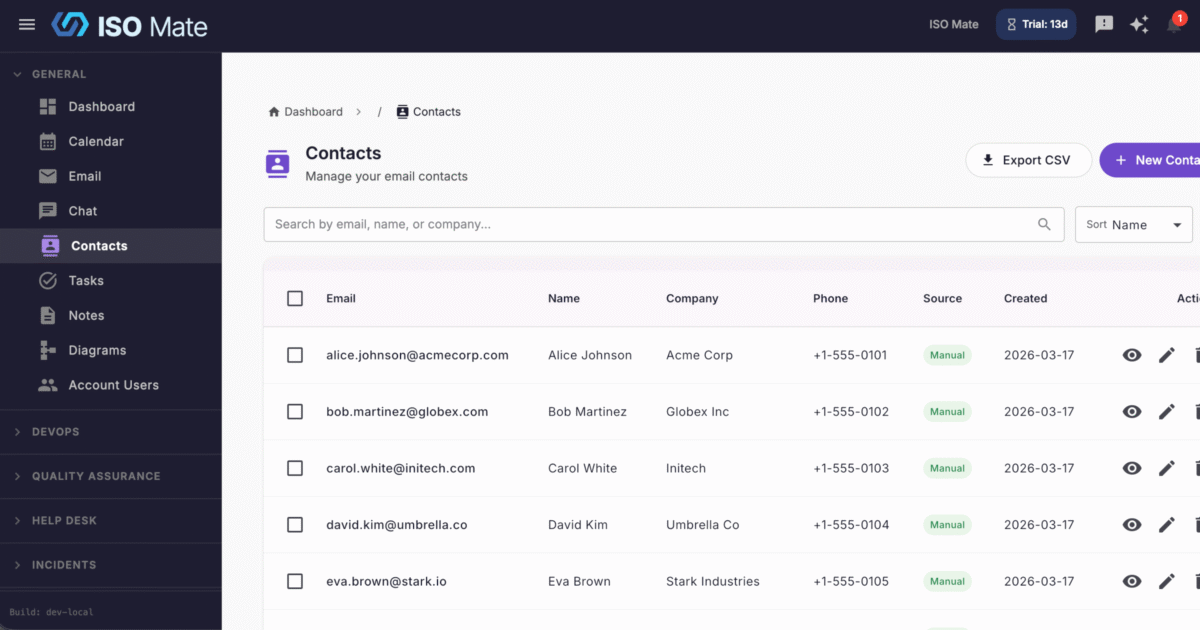
Give your whole team one trusted place to find the people they work with. Contacts is a shared directory that keeps names, emails, and organization details accurate across ISO Mate.
The challenge it solves
When contact details live in personal address books, spreadsheets, and email signatures, everyone works from a slightly different version. Numbers go stale, duplicates pile up, and reaching the right person takes longer than it should. Contacts keeps one shared directory so the whole team has current details in a single place.
What you can do
- Keep every detail in one record: store names, email addresses, phone numbers, and organization details for each contact.
- Skip manual data entry: contacts are captured automatically from your email conversations, ready to review.
- Find anyone in seconds: search across name, email, and organization, then filter and sort to reach the right record.
- Keep the directory current: edit and update details as roles, numbers, and companies change.
- See the full communication history: open a contact to review the emails where they were the sender or a recipient, with sent and received labels, alongside the help desk tickets they raised.
- Act without leaving the record: create a ticket with the contact already set as the requester, and send them an email straight from their communication history.
- Share beyond ISO Mate: export the directory to CSV or PDF for backups, reporting, or import into other systems.
- Connect contacts to your work: link people to Help Desk tickets and sales records so their history travels with them.
Popular use cases
- Customer directory: keep everyone you support reachable and up to date.
- Sales prospects: store the leads and buyers behind your opportunities and deals.
- Vendor and supplier list: track the outside partners your operations depend on.
- Support requesters: recognize repeat requesters and keep their details on hand.
- Team address book: give staff a single, shared source for external contacts.
Works with the rest of ISO Mate
Contacts sits at the center of your customer-facing work. Details are captured automatically from Email Integration, and each contact brings together its communication history: the emails it appears on and the Help Desk tickets it raised, alongside sales records like Leads, Opportunities, and Deals. Workflow Automation can act when contacts are added or change, and the AI Assistant can look up or create contacts on request, so your directory stays useful and current.