
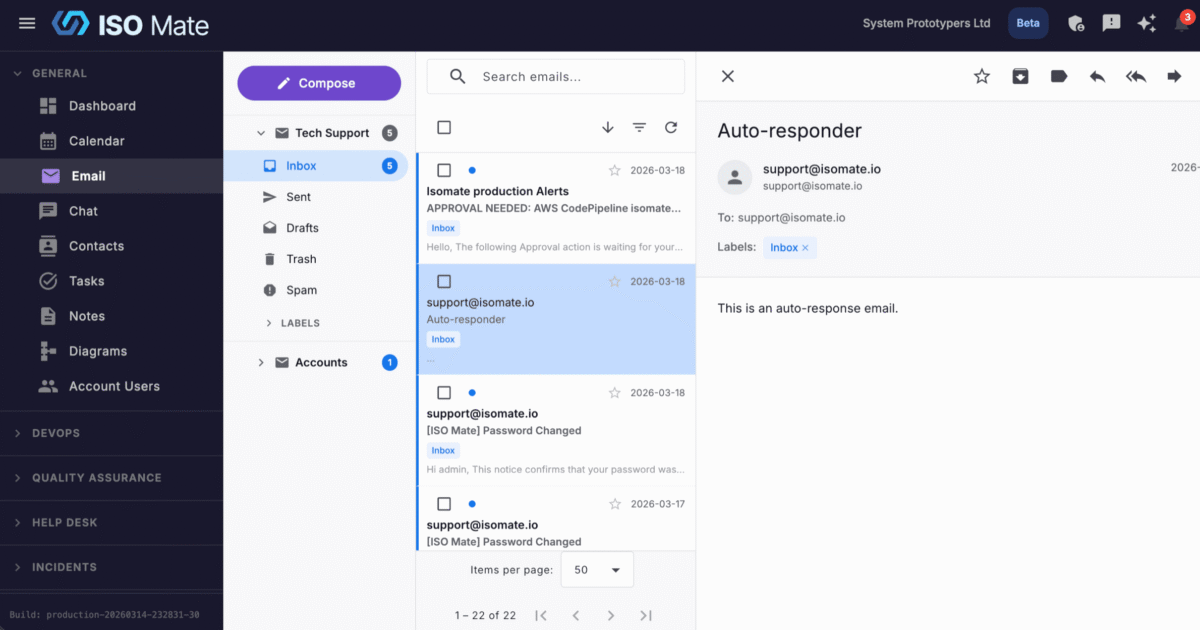
Handle email without leaving your work. Email Integration lets teams connect personal and shared mailboxes, write faster with AI, and keep every message beside the projects and customers it relates to.
The challenge it solves
Jumping between a separate email client and your project tools breaks focus and buries important messages. Replies stall, context gets lost, and shared inboxes turn into a free-for-all with no clear owner. Email Integration brings your mail into ISO Mate so conversations stay organized and connected to the rest of your work.
What you can do
- Connect the mailboxes you already use: link a personal account with Google OAuth for Gmail or IMAP/SMTP, and set up shared mailboxes for team inboxes.
- Write better email faster: draft from a few notes in the tone you choose, then refine for length, formality, or grammar with the built-in AI assistant.
- Compose with confidence: use a rich text editor, add To, CC, and BCC recipients, attach files, and rely on auto-saved drafts so nothing is lost.
- Reply and forward with context: reply, reply all, or forward with the original quoted and your default signature inserted automatically.
- Turn email into action: from a shared mailbox, open a related activity panel to see a message’s contacts and the help desk tickets connected to it, then link the email to existing tickets or create a new ticket prefilled from it with the sender as the requester.
- Keep mail organized: sort into Inbox, Sent, Drafts, Trash, and Spam, plus custom folders and labels for projects or clients.
- Find and act in bulk: search by subject or sender, filter by status, attachments, or date, and mark, star, archive, or delete many emails at once.
Popular use cases
- Shared support inbox: let a team work a common address like support@ or sales@ together.
- Customer correspondence: keep client threads next to the deals and tickets they belong to.
- Faster first drafts: turn rough notes into a polished reply with AI, then adjust the tone before sending.
- Project communications: file emails into per-project folders so the whole team can follow the thread.
- Vendor and supplier emails: track incoming and outgoing messages with external partners in one place.
- Consistent outreach: apply saved signatures so every message stays on-brand.
Works with the rest of ISO Mate
Email Integration powers more than your inbox. Workflow Automation can watch incoming mail and act on it, for example turning a message into a Help Desk ticket automatically, and from a shared mailbox you can also link a message to a ticket by hand or create one from the related activity panel. Shared mailboxes send branded Help Desk replies from the right address, contacts are captured from your conversations into the Contacts directory, and email notifications keep you posted on what needs a response.